Today in class we were visited by Tracy and Kaori from BCEDaccess for a discussion about inclusion in education. More specifically we talked about some technology and how it can aid inclusion. To begin the class, Tracy did an exercise with sticky notes where she gave the majority of the class a pink sticky note, some of the class a green note, a small amount of orange notes and some people did not get a note. She further explained that pink notes meant we could stay, green meant they had to leave after a bit of time, orange meant they could stand in the hallway with supervision and no sticky note meant they had to leave right away and could not participate in class. We were all very confused, some questioned it while others (like Ben) just accepted it. Tracy clarified and said we were just participating in a demonstration of what some kids have to deal with in the school system and it was really eye opening. The idea of a kid not being able to participate in class activities simply because they lacked something that others had is a difficult concept to grasp. Instead of casting them to the side, the school system should be finding ways to better support them.
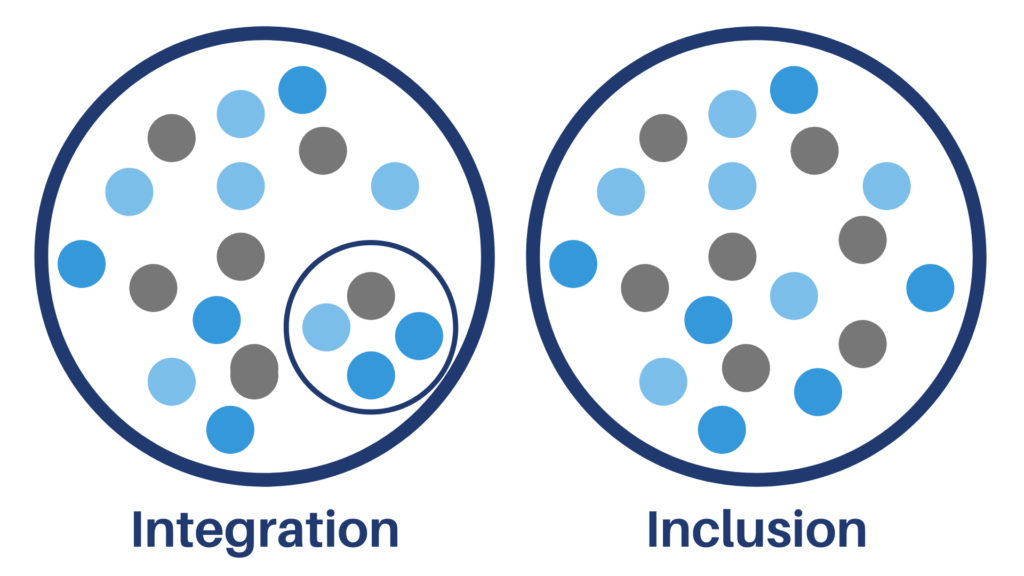
I think of integration versus inclusion is important to discuss. It is important to note that although a student may seem like they are included in the class, they might not be. The image on the left shows the difference between the two terms. Getting a kid that has a designation into the classroom amongst others is an amazing feat and should in no way be discredited. However, we should not stop there. We should try our best to immerse the student in the class content and amongst their peers in order for them to be truly included. Yes, it may be a struggle but it is worth the effort in my opinion. On the flip side of the coin, there may be times where inclusion just may not be optimal for the student, for the rest of the class, and for the staff. In my Link2Practice class, we have a student who has autism and is hardly engaged with the class. There have been efforts to get him both integrated and included but it just is not working right now. The staff involved have taken note of this and are responding with appropriate methods that work for him such as taking time in support rooms, allowing him to leave the class and go for walks, or being in the class without being heavily involved. Although you would like to see him in the class everyday with his peers, it just is not optimal right now and that is okay.
All-in-all I am thankful for the presentation we received today from Tracy and Kaori. What made it memorable for me was how they seamlessly brought in their own personal stories about their experiences with inclusion. It made the presentation much more human and it allowed me to be more engaged.